Advertisement
Click to download now, finish the installation quickly, and directly unlock the "all-round experience"
Advertisement
Screenshots

Click to download now, finish the installation quickly, and directly unlock the "all-round experience"
Epson Smart Panel represents a significant shift in the utility tools landscape, moving away from fragmented printer drivers toward a unified, mobile-first command center. As a high-performance management suite, it streamlines the interaction between mobile hardware and Epson’s wireless ecosystem. Its authoritative approach to device management simplifies complex networking tasks, making it a benchmark for how hardware manufacturers should bridge the gap between physical peripherals and mobile convenience.
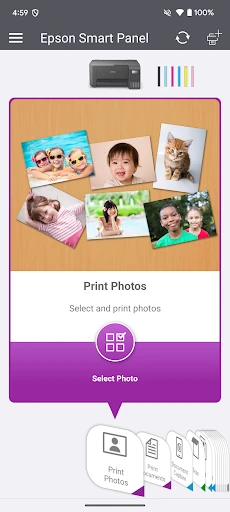
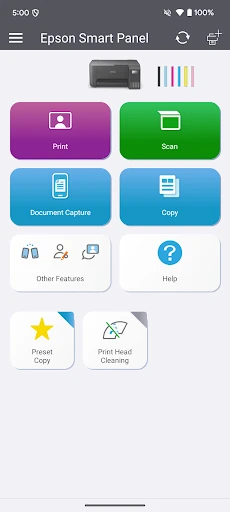
The UI design of Epson Smart Panel adopts a contemporary card-based aesthetic that feels intuitive and clean. Unlike older printing utilities that often felt like desktop ports, this app is built for touch interaction. The "Action Tiles" are large and legible, catering to users of all technical skill levels. From a UX perspective, the auto-customization logic is the standout achievement; by only displaying features compatible with the connected hardware, the app reduces cognitive load and prevents the frustration of "unsupported feature" errors during operation.
To further enhance the user experience, the next update should focus on expanding backward compatibility to reduce the need for legacy apps like Epson iPrint. Additionally, integrating more advanced OCR (Optical Character Recognition) features directly into the scanning tiles would provide a significant productivity boost for users managing digital archives. Improved offline documentation would also help users troubleshoot connectivity issues when the Wi-Fi network itself is the point of failure.
Epson Smart Panel is the definitive tool for owners of modern Epson wireless printers and scanners who prioritize a streamlined, mobile-centric workflow. It is particularly well-suited for students, remote workers, and small business owners who need to manage document cycles without tethering to a PC. While users with legacy hardware must still rely on older utilities, those with compatible devices will find this to be one of the most polished and efficient hardware management apps currently available in the Tools category.